I use AI to simplify legal wording - not to change legal meaning. Start with one client FAQ or checklist, use attorney-approved sources, and keep private client details out of the tool.
My checklist keeps the work focused:
- Preserve the law: Keep rights, duties, deadlines, conditions, and exceptions intact. Define legal terms rather than replace them when precision matters.
- Check every draft: Have an attorney compare it with the source and verify current law in the right jurisdiction.
- Test the result: Check accessibility and ask readers to explain the next step and deadline. The article cites guidance recommending 6–9 reader tests per document.
- Keep a record: Save sources, changes, test results, and written attorney approval.
The rule I follow: <u>clearer wording still needs legal review</u>. AI can help draft and organize text; it cannot replace attorney judgment.
Can AI Translate Legal Jargon Into Plain English? A Proposed Test (2026)
sbb-itb-7e4986a
What AI Can Help Simplify
With those limits in place, AI can help with drafting mechanics. Use it to turn attorney-approved points into plain-language client instructions, FAQs, and educational summaries. Keep its role editorial, not advisory: AI should not decide rights, predict outcomes, or choose strategy. Contracts, releases, settlement agreements, waivers, and court filings require line-by-line attorney review.
Use Shorter Sentences and Clearer Structure
Ask AI to flag long, dense sentences, passive constructions, unclear pronouns, inconsistent terminology, repeated ideas, and unnecessary legal phrases. Tell it to leave defined terms and required steps unchanged.
Request shorter sentences, active voice, descriptive headings, numbered steps, bullet lists, definitions, and a short opening summary. Specify who will read the text and what they need to do, which helps optimize law firm content for AI search and human readers alike. That helps match the explanation to the audience and purpose.
Reading-level scores are screening tools, not proof of quality. They don't catch missing conditions, layout problems, language barriers, or incorrect legal statements.
Set Human Review Requirements for Each Task
Before drafting, use these rules to assign AI tasks and set the required level of attorney review.
| Task | AI role | Required human review | Main risk |
|---|---|---|---|
| Drafting client education | Turn attorney-approved points into plain-language explanations, headings, and FAQs | Attorney verifies legal accuracy and the firm's position | Invented rights, remedies, deadlines, or exceptions |
| Rewriting existing text | Shorten sentences, replace jargon, use active voice, and organize steps | Attorney compares the rewrite with the source, including defined terms and conditions | Subtle changes in legal meaning |
| Summarizing a document | Draft a first-pass summary of an approved document for a specified audience | Attorney checks omissions, qualifications, dates, amounts, exceptions, and adverse points | Leaving out an exception or overstating certainty |
| Explaining legal terms | Give a plain-language definition based on an approved glossary or attorney explanation | Attorney confirms that the definition fits the matter and jurisdiction | Treating a context-dependent term as universally defined |
| Reviewing readability | Flag long sentences, passive constructions, inconsistent terminology, acronyms, and difficult words | A human asks the intended reader to explain the next step, deadline, and open questions | Assuming a favorable score proves comprehension or accuracy |
For binding documents, require a line-by-line check of actors, amounts, timing, conditions, remedies, and words that express certainty or obligation. A request to simplify wording never permits new obligations, remedies, or legal interpretations. After simplifying the draft, compare it with the source before attorney approval.
An Attorney-Led Process for Simplifying Legal Text
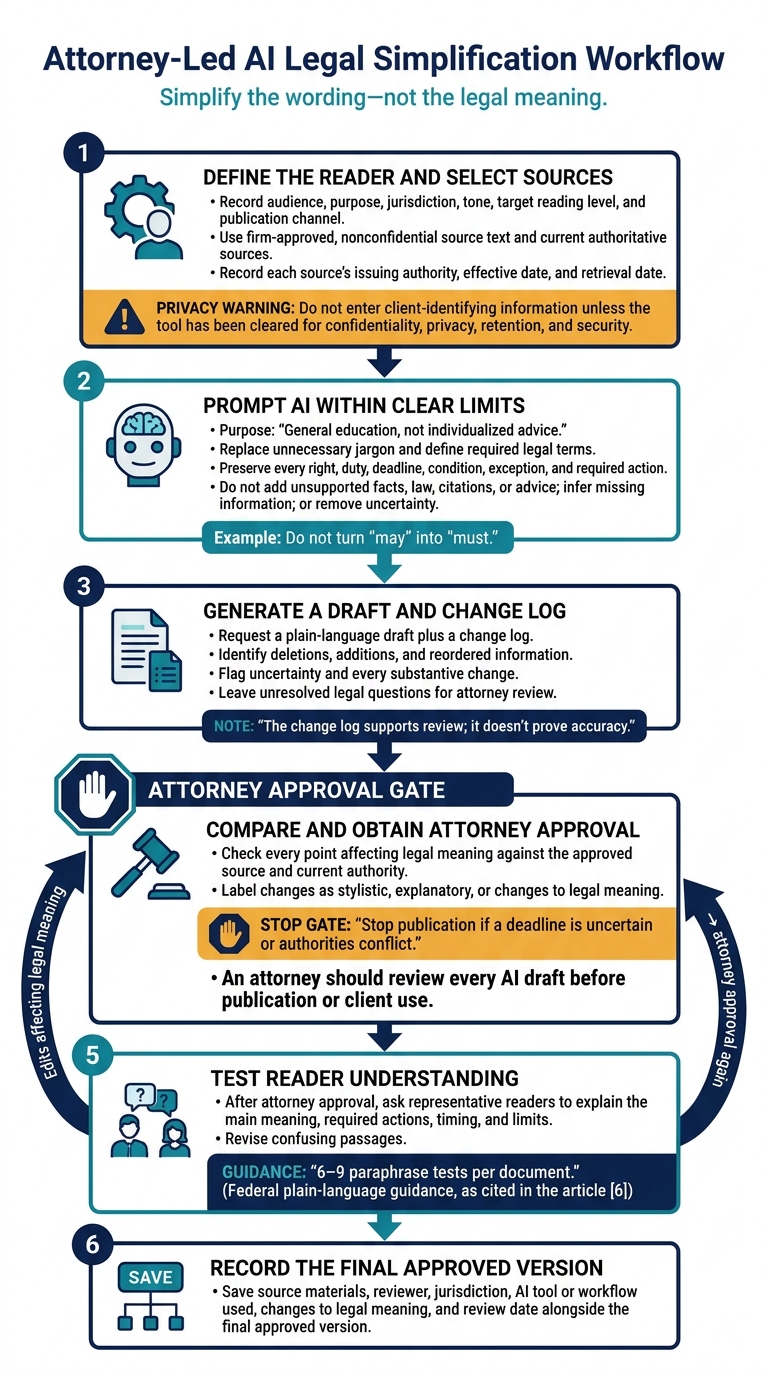
Attorney-Led AI Legal Simplification Workflow
Once the meaning is clear, simplify the wording without changing its legal effect. An attorney should review every AI draft before publication or client use.
Define the Reader and Choose Approved Sources
Record the audience, purpose, jurisdiction, tone, target reading level, and publication channel. Focus on what the client needs to do next - not on internal legal analysis.
Use firm-approved, nonconfidential source text. Don’t enter client-identifying information unless the tool has been cleared for confidentiality, privacy, retention, and security. Choose current authoritative sources or attorney-reviewed explanatory material, and record each source’s issuing authority, effective date, and retrieval date.
With the audience and sources set, write a prompt that keeps the rewrite within those limits.
Write a Prompt That Preserves Legal Meaning
Use this reusable prompt after reviewing the sources. The change log supports review; it doesn’t prove accuracy.
Audience:
Purpose: General education, not individualized advice.
Jurisdiction:
Tone and target reading level:
Approved, nonconfidential source text:

Task:
Replace unnecessary jargon and define required legal terms.
Preserve each right, duty, deadline, condition, exception,
and required action.

Prohibited changes:
Do not add unsupported facts, law, citations, or advice.
Do not remove uncertainty or turn “may” into “must.”
Do not infer information missing from the source.

Review requirements:
Return a plain-language draft plus a change log.
Identify deletions, additions, and reordered information.
Flag uncertainty and every substantive change.
Leave unresolved legal questions for attorney review.
Compare the Draft With the Source
Check every point that affects legal meaning against the approved source and current authority. Label changes as stylistic, explanatory, or changes to legal meaning. Stop publication if a deadline is uncertain or authorities conflict.
A sentence can read more smoothly yet change the legal effect. The hypothetical below gives no specific state deadline.
Hypothetical workers’ compensation source: “A worker must report a workplace injury to the employer within the period required by the applicable state law. Failure to provide timely notice may affect the claim, subject to statutory exceptions.”
Unsafe rewrite: “Tell your employer about the injury when you can.”
Corrected explanation: “Report your workplace injury to your employer as soon as possible and follow the deadline that applies in your state. Missing the deadline can affect a claim, although exceptions may apply.”
Get Attorney Approval and Test Understanding
After attorney approval, test whether representative readers can explain the main meaning, required actions, timing, and limits. Federal plain-language guidance recommends about 6–9 paraphrase tests per document.
Revise confusing passages, and send any edits that affect legal meaning back for attorney approval. Record the final approved version, source materials, reviewer, jurisdiction, traditional vs AI-powered legal marketing workflows used, changes to legal meaning, and review date.
Safeguards for AI-Assisted Legal Writing
Once the draft is simplified, apply safeguards to keep AI-assisted writing accurate, private, and accessible. Set firm-wide rules for permitted AI use, supervision, escalation, and publication, including compliance checks for legal ad campaigns.
Check Accuracy, Privacy, and Accessibility
Before sharing text with any tool, redact names, dates, medical details, locations, and other identifying facts. Combinations of documents can also identify a client. Check for bias and unequal treatment separately from readability.
Apply these controls before drafting, revising, or publishing:
- Changes or omissions that affect legal meaning: The responsible attorney checks that simplification preserves duties, conditions, exceptions, eligibility limits, and necessary defined terms. The review also checks for bias, stereotypes, and unsupported assumptions.
- Invented facts or citations: The responsible attorney independently verifies authorities, quotations, and facts against primary sources and approved records.
- Outdated law: An attorney familiar with the jurisdiction confirms current law, effective dates, and procedures through official sources.
- Sensitive-data exposure: Before allowing sensitive inputs, the supervising attorney reviews vendor security, access controls, retention, deletion, breach procedures, contract terms, and data-reuse practices.
- Inaccessible explanations: An accessibility reviewer checks for dense text, vague links, and broken screen-reader order. The reviewer also tests headings, contrast, keyboard access, and screen-reader compatibility. Edits that affect legal meaning go back to an attorney.
Keep Approved Glossaries and Review Records
Use approved glossaries that specify jurisdiction limits and prohibited substitutions so simplification doesn't change legal meaning. Give each resource an owner and a review date. Review it sooner if relevant law or procedures change.
Keep glossary and publication-approval records under the firm's retention and access rules, without retaining unnecessary confidential prompts.
Conclusion: Start With One Reviewed Client Resource
Put the review workflow in place first. Then simplify the wording - not the legal meaning. AI can help make text clearer, but an attorney remains responsible for preserving rights, deadlines, conditions, remedies, and required actions.
Start the pilot with one narrowly defined practice-area resource. Use approved sources and leave out confidential client details. Before publication, compare the draft with its sources, check facts and legal authorities, and test accessibility.
Ask lay readers who didn’t write the draft to explain the main point, name the next step, and say when they should contact a lawyer. Rewrite any passages they misunderstand so they can act correctly. Keep a record of the attorney’s written approval, source materials, testing results, and publication date.
Use reader questions and corrections to assess whether the workflow is ready for more resources. Expand only when AI changes legal marketing to produce accurate drafts, clear reader responses, and documented attorney approval.
FAQs
Which legal terms should I leave unchanged?
Keep technical legal terms unchanged, including Latin phrases and procedural terms such as voir dire (the process of questioning potential jurors). Follow each term with a brief, plain-English definition in parentheses or the next sentence so clients and AI systems can understand it. This preserves legal precision and professional authority while making the text clear for readers and AI search engines.
What if my plain-language summary conflicts with the contract?
The contract’s terms take priority over any plain-language summary. A summary is only an educational tool. Treat AI-generated summaries as drafts that need careful human review and verification by an attorney.
To determine your rights, deadlines, or obligations, rely on primary legal sources and official documents, not simplified explanations. A disclaimer cannot fix a misleading explanation of the contract.
When should I recheck AI-simplified legal content?
Recheck AI-simplified legal content before publication and after material changes to statutes, regulations, or case law. A human must verify legal claims, credentials, and compliance with ethics rules before the content goes live.
Check evergreen content for accuracy quarterly or semiannually. Also, conduct monthly reviews of accuracy, visibility, and legal risk, and record needed fixes in a dedicated log.